Acoustic feedback.
Just the headset mic.
Hear an example, play the note and let WGuitar listen through Quest’s own microphone. Acoustic note feedback needs no guitar cable, pickup, audio interface or external microphone.
REAL GUITAR. MIXED REALITY.
Your real guitar. Your Quest microphone.
Hear it. Play it. Keep improving.
Choose a song, place the guide and play with your hands free. Follow spatial teaching cues and hear acoustic note feedback through the Quest microphone. No guitar cable or external mic needed.
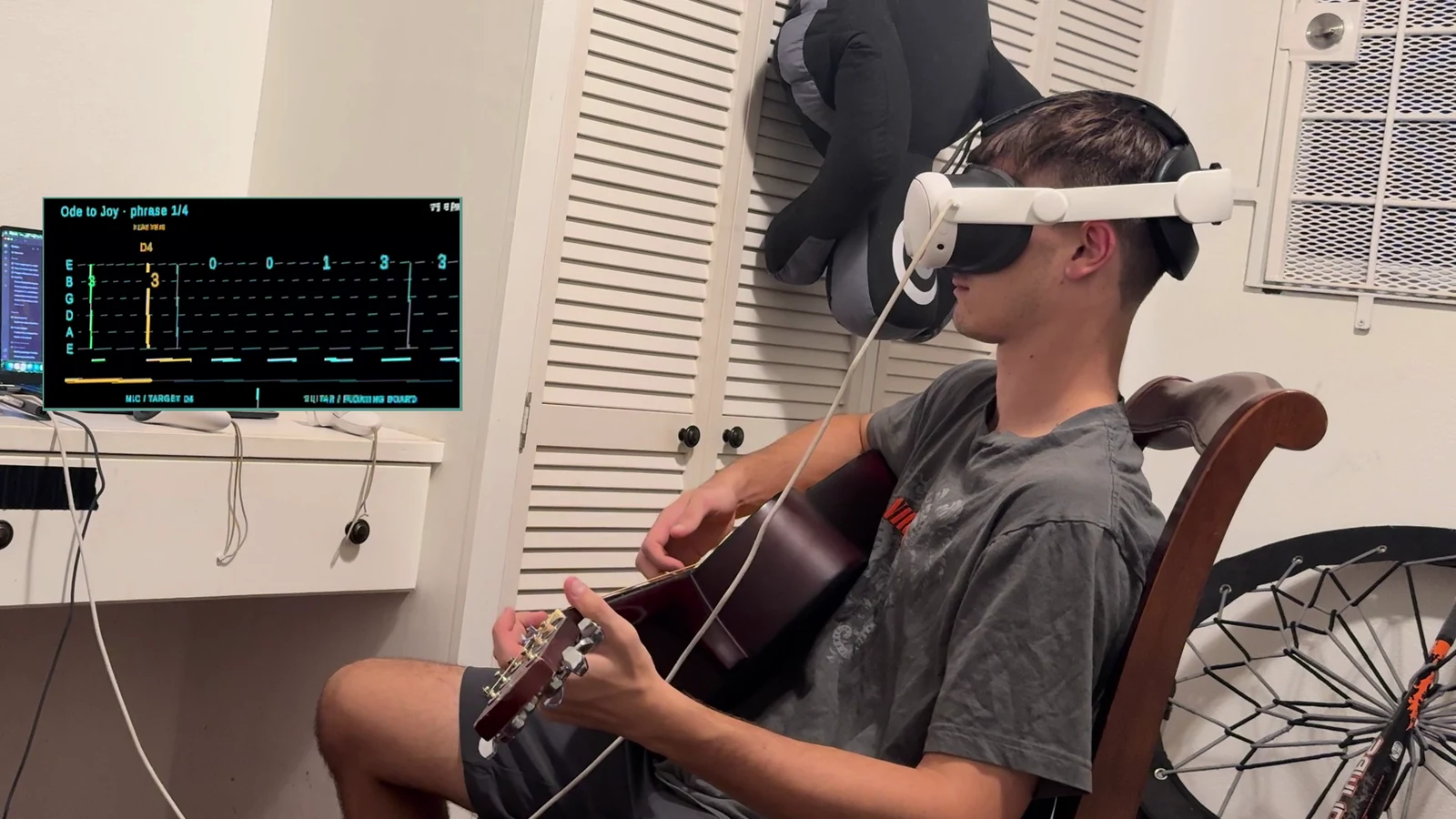 Outside-camera footage · live app inset 0:32
START WITH A LITTLE MUSIC.
01 / HEAR IT Listen to a short phrase
02 / TRY IT Follow the notes at your pace
03 / PLAY IT THROUGH Find the rhythm in Quick Play
THROUGH QUEST 3
Actual headset footage. Point and pinch to navigate, then bring your picking hand back to the strings.
WHY WGUITAR
HEAR · SEE · PLAY · RETURNReal playing, spatial teaching and a useful next step, connected in one hands-operated practice space.
Hear an example, play the note and let WGuitar listen through Quest’s own microphone. Acoustic note feedback needs no guitar cable, pickup, audio interface or external microphone.
Fit string and fret cues to your real guitar, or place a floating reference beside it. Teaching hands demonstrate suggested fretting and picking while TAB shows the written part.
Set up, choose a lesson, pause, adjust and resume with hand controls. Controllers are optional, so you can move between playing and interacting without picking one up.
Take your time in Guided, find the rhythm in Quick Play and revisit music with fewer hints. Local Coach, short plans and history connect today’s result to your next session.
Choose Controller tracking for guidance that follows your guitar, or a stationary Floating board you can position with your hands. Keep your practice space comfortable, then focus on the next phrase. Compare the placement options
WATCH THE REAL PRACTICE
Outside-camera playing and first-person Quest footage show the studio in use, with close-ups of the app’s teaching and practice tools.
Watch the guitarist choose a song, move a fretboard into reach, and play along with the falling notes. The closing Quick Play run shows the headset registering consecutive hits.
A captioned, one-minute look at building a hands-first guitar practice studio on Quest.
A short visual introduction to the beta’s guided practice, teaching hands, phrase loops and Quick Play, using app interface captures and editorial visuals.
0:54 · Visual practice overview
A LITTLE MUSIC, RIGHT HERE
Eight notes from Ode to Joy. Hear the opening, then follow the light at your own pace.
Tap the highlighted note. In WGuitar, you play your real guitar.
Explore practice on QuestNEXT NOTE
Let’s hear it first.
Then tap the glowing string and fret.
0 of 8 notes
Sound is unavailable in this browser. You can still follow the highlighted notes.
A simplified two-string illustration. Browser taps advance the preview; this does not listen to or assess your playing.
Put on Quest 3, sit with your guitar and open WGuitar. Start with a floating fretboard, then try guidance on the instrument when you are ready.
From Home, open Practice → First song. Choose Floating board in setup and place it where you can see it comfortably. Allow microphone access to hear your acoustic guitar.
Start Guided with Ode to Joy. Listen to the example and follow the teaching hands. Play the highlighted string and fret, then watch for the next note.
At Results, choose Try real time. Follow the count-in, moving TAB and Falling Notes in Quick Play. Slow the tempo and loop the bars you want to repeat.
Exploring with just the headset? In setup, choose Floating board and set Audio scoring to Off. In Guided, tap I played it for each target. Set scoring Off separately when starting Quick Play.
MAKE THE PHRASE YOURS
01 / 05Guided waits for each note. Quick Play follows the beat. Start with First song, then explore more from Practice.
Use Controller tracking for guidance that follows your guitar, or start controller-free with a floating board. Compare the two placement options.
See the string, fret and suggested finger for each target. Preview a phrase, then play it at your own pace with microphone pitch feedback or manual note confirmation.
Read moving TAB or follow Falling Notes: six string lanes carry fret numbers toward the play line. Pick as the number reaches the line; the bar shows how long to let it ring. Set a comfortable tempo and repeat a phrase.
Explore seven scale families across five keys. Hear each note, see its musical role and build familiarity with ascending, descending and grouped patterns.
QUICK PLAY · FALLING NOTES
Each lane is a guitar string. The number is the fret, with 0 for an open string. Play at the line, then let the note ring for the length of its bar.
Use the count-in, metronome and tempo controls to find your pace. Loop the tricky part before playing it through.
See Quick Play in the appFret 3 on string 1. Pick at the line, then let it ring.
A CLOSER LOOK
02 / 05Follow your first fret cue, choose a part in the library and play a phrase. Coach helps you decide what to practice next.
These views come from the app running in the Unity Editor. Select a screen to read the controls.
THE GUIDANCE, UP CLOSE
Six strings, fret positions and current/next note cues make the guidance easy to follow. Rotate this interactive illustration to explore the fretboard.
Drag to find your angle. Switch to Move to position the outline in space.
An interactive web illustration inspired by the app's actual fretboard. Mixed reality guidance runs in WGuitar on Quest.
Focus the model. Arrow keys rotate or move. M switches tools. + / − zoom. R resets. Space pauses motion. Shift + drag moves. Ctrl + scroll zooms.
SEE THE NEXT MOVE
See suggested finger positions on the virtual fretboard, with animated fretting and picking examples. Follow the shape, hear the note and try it on your guitar.
Left or right handed.
Floating reference or fitted guidance.
MAKE PRACTICE YOURS
03 / 05A tuner before you start. Tempo and loop controls while you play. A practice history to return to next time.
BUILT-IN SCALE LIBRARY
140scale & pattern lessons
Slow a phrase down, set a loop and build speed through clean passes. Move from Guided to Recall and Perform as the music becomes familiar.
TEMPO · LOOPS · RECALLKeep a practice history, revisit difficult sections and get a suggested next step from Coach. Your progress stays on your headset.
HISTORY · COACH · LOCAL SAVESReady before the first note. A built-in tuner and soundcheck help you get set.
THE SONGBOOK
Work through 19 arrangements of 10 songs and original studies, including Ode to Joy, Greensleeves, Amazing Grace and Für Elise.
Bring a part of your own. Open Library → My tabs → Upload tab. Select a Guitar Pro file, MusicXML score or six-line text tab, review the guitar part and add it to your headset library. Personal tabs stay on your headset, separate from the bundled songbook. Text-tab rhythm is approximate.
Download an original practice tab Four beats to try in My tabs. Save it to Quest using the headset browser.
YOUR SPACE. YOUR INSTRUMENT.
Bring a standard-tuned six-string guitar and a Meta Quest 3. Keep your instrument in view through passthrough, with practice controls around you.
Point, pinch or tap to navigate. Move panels into place with your hands. Controllers are optional.
CONTROLLER TRACKING
SECURE · FIT · CHECK · PLAYUse one Quest controller as the guitar's tracking reference. Choose Controller in session setup, then match the selected left or right controller to the one you attach. You will need a secure, padded mount suitable for your instrument.
Mount it near the tuning keys with the tracking surfaces exposed. Keep the strings, tuners and buttons clear. Check the mount cannot slip, wake the controller, then confirm the mount in the app.
Move, turn and resize the grid to match the nut, twelfth-fret wire and outer strings. Check the fret spacing along the neck, then save the fit.
Gently move the guitar and confirm the guide stays aligned. Choose Use this fit, then start Guided or Quick Play. If tracking is interrupted, practice pauses. Check alignment before resuming; refit if the mount has moved.
Hands operate the menus. The mounted controller is only the guitar’s tracking reference. For practice without attaching a controller, choose Floating board and position it where you want to practice.
WGUITAR FOR META QUEST 3
04 / 05Your real guitar, with spatial guidance, teaching hands, songs, scales and practice tools in one standalone app. We’re preparing the Early Access beta for Meta Horizon Store at US$11.99, with Controller tracking and a stationary Floating board.
Save the website to revisit its app details and screenshots offline. The Quest app will be a separate download.
Follow a melody note by note.
Repeat a phrase at a slower tempo.
Explore scales across five keys.
A FEW THINGS TO KNOW
05 / 05Yes. WGuitar is designed for your own standard-tuned six-string acoustic, classical or electric guitar, with Meta Quest 3 providing the mixed reality view. Use the built-in tuner, soundcheck and microphone practice feedback. Electric guitar accuracy depends on amp settings and sound clarity; a clean tone with minimal effects gives the clearest input.
The First song route starts with Ode to Joy in Guided practice. String, fret and finger cues introduce the next note, and you can hear the phrase before playing it. An optional quick-start guide explains the controls and tab notation.
For acoustic note feedback, no. WGuitar uses the microphone built into Meta Quest 3, so no guitar cable, pickup, audio interface or external microphone is required. Electric practice needs a clear amplified signal the headset can hear; begin with a clean tone and moderate volume.
WGuitar connects real-guitar spatial guidance, native headset-microphone feedback, authored teaching hands and complete hands-operated controls. Guided practice, moving TAB, phrase loops, reduced hints and local Coach turn that combination into a repeatable session on the instrument you already own.
The microphone supplies tuning, soundcheck and played-note feedback. It listens for pitch to help with practice targets. It does not verify your finger placement, exact string, complete chord shape or general playing technique. Electric guitar accuracy depends on amp settings and clarity.
Choose Controller tracking for guidance that follows your guitar, or Floating board for a stationary reference you position with your hands. These are the two placement options in the Early Access beta.
Only for Controller tracking. Secure a padded mount near the tuning keys, fit the virtual fretboard, check alignment and play. Hands operate the menus; the mounted controller is only a tracking reference. Floating board needs no mount or camera tracking.
Practice history, preferences and microphone analysis stay on the headset. Normal practice does not upload camera images or audio. This release page has no account system or analytics and caches its own files for offline access.
The Early Access beta is being prepared for Meta review. The planned price is US$11.99 as a one-time purchase, with future app updates. There is no public download yet. Installing this website saves the release page; the Quest app is a separate application.